


Download VAVOO – free IPTV streaming app for movies, TV shows, music and radio
Overview
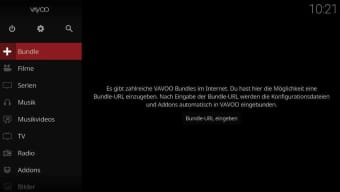
VAVOO is a multimedia hub that turns your device into a versatile IPTV player. Unlike mainstream on‑demand services such as Netflix or Hulu, VAVOO does not host its own catalog; instead, it lets you plug in a “bundle” – a collection of URLs that point to TV‑show, movie, music or radio streams hosted elsewhere on the internet. Once a bundle is entered, VAVOO parses the list, pulls in the necessary add‑ons and presents the content in a clean, German‑language interface that mirrors the popular Kodi media centre.
The app is designed for binge‑watchers who want a single place to manage multiple sources, whether they are public domain libraries, legal streaming portals, or personal network shares. VAVOO’s promise is simple: “Play any content, any time, anywhere,” while staying lightweight enough to run on older PCs, Android tablets or even modest smartphones. The program is free to download, but access to a bundle usually requires a subscription fee set by the bundle provider.
Because VAVOO does not filter the URLs you add, users must verify the legality of each source. In practice, this means you have full control over what you watch, but also the responsibility to avoid pirated streams. The app’s biggest strengths are its flexibility, its low‑resource footprint, and its ability to integrate music videos, podcasts and radio stations alongside traditional video streams.
If you’re comfortable managing bundle URLs and you have a stable Wi‑Fi connection, VAVOO can become the central hub for all your entertainment needs.
Key Features and What Sets VAVOO Apart
- Bundle‑Based Streaming: Import a single URL that contains dozens or hundreds of stream links, allowing instant access to a curated library of movies, TV series, music videos, and radio stations.
- Cross‑Platform Compatibility: Runs on Windows, macOS, Android and iOS, making it easy to sync your viewing experience across desktops, laptops, tablets and smartphones.
- Local and Network Playback: In addition to online bundles, VAVOO can play files stored on your device or shared over a local network (NAS, SMB, DLNA).
- Add‑On Marketplace: Purchase or download optional add‑ons that bring extra portals, podcast managers, or subtitle fetchers directly into the interface.
- Lightweight Engine: Optimised for low‑end hardware; the app consumes minimal RAM and CPU, which is ideal for older PCs or budget Android boxes.
- Unified Media Library: All content – video, audio, radio, podcasts – is organized into intuitive categories, enabling quick navigation with a single tap or click.
- Secure Update Mechanism: Automatic, signed updates keep the software current without exposing you to malicious code.
- Customizable UI: Although the default language is German, users can change the interface language via community‑generated language packs.
While many IPTV players focus on a single source (e.g., a proprietary streaming service), VAVOO’s bundle concept gives you the freedom to switch providers without reinstalling the app. This modular approach also means you can experiment with niche genres – such as independent documentaries or foreign‑language radio – simply by loading a different bundle file. The add‑on ecosystem further expands functionality: a popular “YouTube Portal” add‑on lets you browse YouTube channels without leaving VAVOO, while a “Podcast Manager” pulls in RSS feeds and provides episode‑by‑episode playback. For power users, the ability to add local network shares means you can host your personal movie collection on a home server and stream it just as smoothly as any online source.
Installation, Usage Instructions and Compatibility
Step‑by‑Step Installation
- Visit the official VAVOO website or a trusted app store and click the Download button for your operating system.
- For Windows/macOS, run the installer (.exe or .dmg) and follow the on‑screen prompts. On Android, download the APK from a reputable source and enable “Install unknown apps” if required. iOS users can obtain the app via the TestFlight program (subject to developer invitation).
- After installation, launch VAVOO. The first screen asks for a bundle URL. Paste the link provided by your subscription service or the free bundle you wish to try.
- The app will automatically download the configuration files, install any recommended add‑ons, and refresh the media library.
- Navigate the main menu to explore categories such as Movies, TV Shows, Music, Radio and Podcasts.
Operating System Support
VAVOO is officially supported on Windows 7 and newer, macOS 10.12+, Android 5.0+ (ARM and x86 devices), and iOS 12+. Because the core engine is built on the cross‑platform Qt framework, the user experience remains consistent across all platforms. The Android version includes a “Background Playback” option that lets you listen to radio or podcasts while using other apps, while the Windows version offers a “Mini‑Player” mode that docks the video into a small window for multitasking.
First‑Run Usage Tips
Once your bundle is loaded, you’ll see a grid of thumbnails. Clicking a thumbnail starts playback instantly, provided you have a stable internet connection (preferably Wi‑Fi). VAVOO streams at adaptive bitrates; if your connection drops, the player will automatically switch to a lower quality to avoid buffering.
For local files, use the “Add Folder” option in Settings to point the app at a directory on your hard drive or network share. To customize subtitles, enable the “Auto‑Subtitle” add‑on, which fetches matching SRT files from open databases. Finally, explore the “Add‑On Store” in the Settings menu to install extra portals, such as live sports streams or niche music channels.
Pros, Cons, FAQ and Expert Review
Pros
- Highly flexible bundle system – one URL unlocks hundreds of streams.
- Runs smoothly on older hardware and low‑end Android boxes.
- Supports local files, network shares, podcasts and radio in addition to IPTV.
- Free to download; only the bundle subscription may carry a cost.
- Automatic updates keep the app secure and compatible with new codecs.
Cons
- Default interface language is German, requiring language packs for other users.
- Relies on user‑provided bundles; illegal streams are not filtered.
- High data consumption – best used on Wi‑Fi or unlimited broadband.
- No native on‑demand library; you must find or create your own bundles.
- iOS availability limited to beta/testing channels.
Frequently Asked Questions
Is VAVOO legal to use?
VAVOO itself is a legal media player. The legality depends on the URLs you add via a bundle. Users must ensure that the streams they access are licensed or in the public domain.
Can I watch live TV channels with VAVOO?
Yes, many bundles include live TV stream URLs. Once the bundle is loaded, live channels appear alongside on‑demand movies and shows.
Does VAVOO support subtitles?
VAVOO can load external subtitle files (SRT, ASS) manually, and the optional “Auto‑Subtitle” add‑on can fetch matching subtitles from online databases automatically.
What internet speed is recommended for smooth streaming?
A minimum of 5 Mbps is recommended for HD streams, while 10 Mbps or higher provides a buffer‑free experience for 1080p content. For 4K streams, 25 Mbps or more is advisable.
Can I use VAVOO on a smart TV?
If the TV runs Android TV or can install an Android APK, you can sideload the VAVOO app. Otherwise, you can cast from a mobile device or use a streaming stick (e.g., Amazon Fire TV) that supports Android apps.
Expert Review
Rating: 4.2/5
VAVOO delivers a compelling blend of flexibility and performance. Its bundle‑centric model appeals to power users who want total control over their streaming sources, while the lightweight engine ensures smooth playback on virtually any device. The primary drawbacks—German‑only UI and the need to vet bundles—are mitigated by community‑driven language packs and reputable bundle providers. For anyone comfortable navigating URL‑based playlists, VAVOO stands out as a versatile, future‑proof IPTV hub.
Conclusion and Call to Action
In a market saturated with subscription‑heavy on‑demand services, VAVOO offers a refreshing alternative: a free, open‑ended platform that puts the power of content selection back in your hands. Its ability to merge online IPTV bundles, local media libraries, podcasts and radio stations into a single, resource‑light interface makes it a strong contender for anyone looking to consolidate their entertainment ecosystem. While the language barrier and the responsibility of choosing legal streams require a bit of extra effort, the payoff is a highly customizable viewing experience that can evolve with your tastes.
If you’re ready to explore a more flexible way to stream movies, TV series, music videos and live radio, USD 0.00 – download VAVOO now and start testing bundles that match your interests. Remember to pair the app with a reliable Wi‑Fi connection and verify the legality of each source. Happy binge‑watching!







